Why AI Took Us Back to Terminals—and Where It's Taking Us Next
From terminal-style chat to autonomous agents to generative UI—how human-computer interaction is being reimagined in three acts.
The landscape of user interfaces is undergoing seismic shifts. What began with the release of ChatGPT has evolved into a complete reimagining of how humans interact with software. This evolution unfolds in three acts: the disruption of the GUI by chat interactions, the rise of autonomous agents, and a third act still taking shape. The first is behind us. The second is unfolding now. What follows is a prediction for the third: the emergence of Generative UI (GenUI) as the future of business applications.
Here is how we are moving from static text responses to fully customized "Mission Control Centers."
Act I: The Terminal Renaissance and Its Limits #
The first act of disruption began with the mainstream adoption of generative AI, specifically through interfaces like ChatGPT. Suddenly, complex queries, code implementation, and detailed answers became accessible through natural language.
Interestingly, this shift felt like a paradox. In many ways, it was a fallback to the era of computer terminals—a step "backward" into the past where interaction was purely text-in, text-out, rather than clicking widgets on a graphical interface. However, unlike the command lines of old, this interface is accessible to everyone because it uses natural language rather than code or shell commands.
For tech-savvy developers who still thrive in terminals, text-focused interactions can be highly efficient. But the approach comes with clear drawbacks.
The Static Output Problem #
While multimodal capabilities (images, video, documents) are expanding on the input side, the output remains predominantly text or code. This creates a critical limitation, especially in professional contexts:
Unsuitable for structured data. The most critical business data lives in tables and databases, but complex tabular data and charts are poorly represented in pure text. Ask an AI about your sales pipeline and you'll get paragraphs where you need a sortable spreadsheet.
Responses are frozen in time. A text response—even a generated image—is static. If a sales manager asks for the latest numbers on Friday evening, that answer is obsolete by Monday morning. To get an update, you must ask the same question again. The world is dynamic, but the output of Act I is not.
Act II: The Agent Disruption #
The second act is currently unfolding: the rise of AI agents. While if fundamentally shifts the user's role from "solving the problem" to simply "defining the intent.", it is logical continuation of Act I and builds on the newly established chat interfaces.
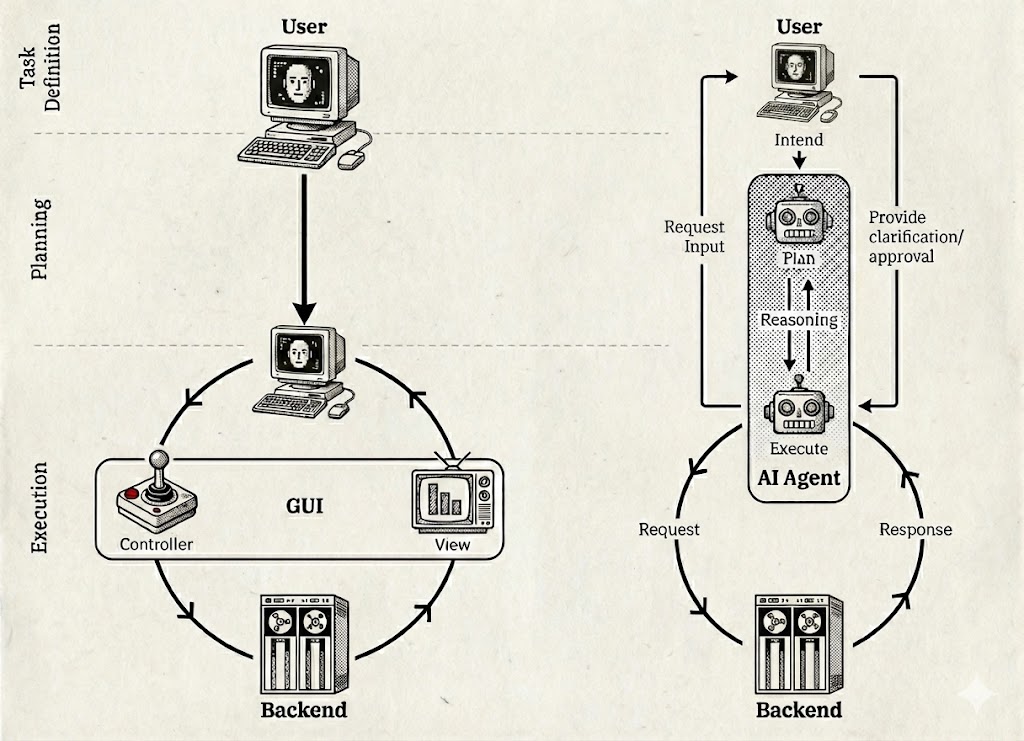
The Traditional GUI Paradigm #
In traditional software, the Graphical User Interface acts as a translator between the user and the backend. The user is responsible for task definition and planning. The GUI provides the View (translating raw data to visuals) and the Controller (buttons to trigger backend actions). This means:
- The user must know the correct sequence of clicks to achieve a goal.
- The user is largely left alone to figure out the problem-solving path.
- The software provides tools, not solutions.
The Agent Paradigm #
With AI agents, the user simply provides intent. The agent takes over planning, reasoning, and execution.
Autonomy. The agent breaks down the task and executes the necessary steps, often bypassing the GUI entirely to communicate directly with backend systems via APIs for greater efficiency.
User role. The user is only kept in the loop for clarification or approval—not for manual execution.
While Act II dramatically reduces the need for complex static interfaces, it doesn't solve the "dead data" problem. We still need ways to see what's happening, to understand context, and to maintain situational awareness of our business. Agents execute, but humans still need to observe and steer. The steering of agents comes naturally via the chat interfaces established in Act I.
Act III: Generative UI and Intent-Driven Applications #
The final act addresses the gap between static text outputs and the need for dynamic control: Generative UI (GenUI).
GenUI bridges the gap by generating UI based on user prompts. The generated interface consists of widgets that are not frozen text, but live views directly connected to backend systems. This leads to the concept of "batch size one" applications: custom interfaces created for a single specific purpose.
There's a fundamental correlation between how long it takes to build a UI and how specific it can be. If a UI takes months to build, it must be generic enough to stay relevant for years to justify the investment. But if you can prompt a UI into existence in seconds, you can create highly specific views—for a particular project, a specific analysis, or even a single use. Without diminishing the concept, we might also call these disposable interfaces. When creation becomes this easy, cheap, and accessible, users will iterate rapidly, and most variants of a generated UI will serve only as stepping stones to the actual desired UI.
However, GenUI should not be seen as an UI-building assistant that allows users to control interfaces at the pixel level. On the contrary, GenUI's success depends on a harmonized design approach. While the content becomes maximally flexible, the design language must remain consistent. Harmonized components ensure learnability even as interfaces become increasingly ephemeral. Enterprise design systems—collections of reusable UI patterns such as list views, analytical displays, and detail pages should be used as the building blocks that GenUI assembles on demand.
From Dashboards to Mission Control #
The ultimate goal of GenUI is not just to observe the business (like a traditional dashboard) but to steer it.
Interactive and transactional. A GenUI shouldn't just provide read-only views. It should function as a Mission Control Center where users can monitor live data and take action—deploying agents to execute tasks or triggering transactions directly. The agents of Act II need to be first-class citizens, natively embedded in these generated interfaces.
This is the vision of intent-driven applications—a paradigm where we no longer rely on rigid, pre-built software suites, but instead generate ephemeral, personalized, and transactional interfaces tailored exactly to the problem at hand.
The goal isn't to eliminate structure—it's to generate the right structure for the moment, then let it dissolve when it's no longer needed.
Looking at your document and the audio transcript input, I'll write the "Striking the Balance" section to match the style, length, and argumentation of your post.
Why GenUI Must (for now) Complement, Not Replace #
For GenUI to succeed, it cannot simply replace existing applications wholesale. The transition requires careful balance—and addressing three fundamental challenges.
Trust. When a critical transaction occurs in a completely unfamiliar, dynamically generated interface, users may not accept it at face value. They'll want to verify whether it actually happened, especially for high-stakes operations. This is where the harmonized design language becomes essential: familiar components and established patterns create anchors of trust within novel interfaces. Additionally, complete lineage—a transparent trail of what happened and why—helps users verify and understand system behavior without reverting to legacy tools.
The Blank Page Problem. If users always face an empty canvas waiting to be filled by prompts, cognitive load becomes overwhelming. Not everyone wants to be an application architect every time they open their tools. Expert-curated default views—drawing on decades of domain knowledge baked into existing interfaces—provide sensible starting points. GenUI should enhance these foundations, not force users to rebuild them from scratch.
Unknown Unknowns. If you only see what you explicitly prompt for, you'll miss everything you didn't think to ask about. This is particularly dangerous in monitoring and oversight contexts, where a critical alert you never requested could go unnoticed. GenUI applications must therefore be proactive—surfacing relevant information based on expert knowledge, not just user queries. The established views of traditional applications encode years of hard-won experience about what matters; discarding that wisdom would be a significant loss.
The path forward isn't replacement but coexistence—at least initially. The most promising approach is likely to introduce GenUI as an alternative engagement layer alongside traditional UIs, allowing users to switch between the two. Over time, as the technology matures and best practices emerge, GenUI can progressively absorb the role of traditional interfaces—eventually making them obsolete. One path to get there: transferring established views and patterns into the GenUI framework, preserving decades of domain expertise while unlocking the flexibility of generated interfaces. GenUI succeeds not by erasing the familiar, but by building upon it—until it becomes the new familiar.
The Curtain Is Already Rising #
This isn't a distant vision. Multiple initiatives are already pushing toward UI generation as a core capability:
- Google Research: "Generative UI: A rich, custom, visual interactive user experience for any prompt": Blog Post by Google Research on GenUI including a introduction of an experimental GenUI feature to Google's Gemini App
- A2UI is exploring frameworks for AI-to-UI generation used for example by CopilotKit
- MCP Apps from the Model Context Protocol initiative demonstrates how AI systems can spawn interface elements dynamically
The trajectory is clear. Act I democratized access to AI. Act II is democratizing execution. Act III will democratize the interface itself—making every user, in effect, their own application developer.
The question isn't whether this shift will happen, but how quickly organizations will adapt to a world where the application layer becomes fluid, ephemeral, and personalized by default.